
October 18, 2024 Release

What’s New
- New Features
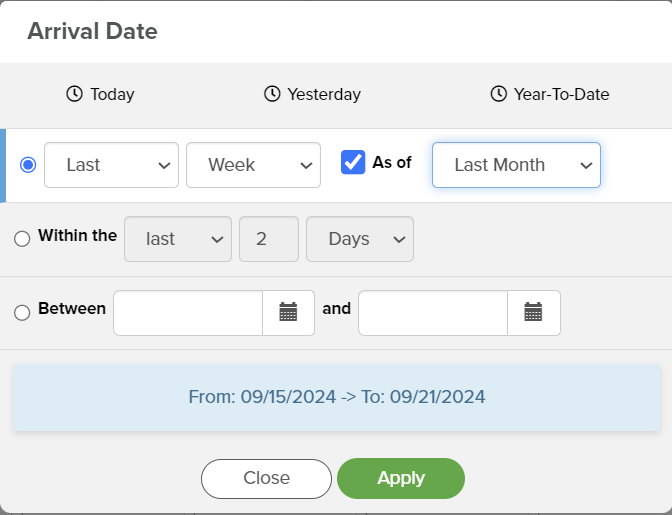
- Platform: Enhance index performance and reliability, Clarify date filter dialog with exact day/month/year range feedback.
- Optix: Improve data source selections with filtering, icons, and consistent style; Initial work to make trial periods modifiable.
- Maintenance
- Platform – Grouped Table Subtotal Child Trees Now Render Properly
- Platform – Storyboard Cascade Filters Implemented in Labs Mode
- Platform – Corrected Issue with Group Pivot Table Blank Rows
- Platform – Copying Actionable Link URLs No Longer Breaks Variables
- Platform – IA Visual Library Images No Longer Duplicate on Snapshot
- Optix – Added New ‘Days Remaining’ and ‘Plan’ Tags to Email Templates
- Optix – Trial/Expired Users No Longer Experience Overlapped Template Library Filters due to Banner element
New Features
In this release, the nucleus team focused primarily on overall performance speed, date filter dialog feedback, and Optix onboarding service plans.
For the date filter dialog, when using a date/datetime filter users are now able to see the date range query in the Storyboard editor. The nucleus team plans to implement this new feature throughout the platform in a future release, but for now, this feature is solely active in the Storyboard editor.
If you have any questions or encounter any problems, please contact: support-nucleus@vantage.com