
October 19, 2023 Release

What’s New
- New Features
-
- Platform
- Updated the UI for list table visuals to support sorting for each column.
- This new style format for list table visuals will look similar to how a user can sort a raw/grouped table currently in the Storyboard editor.
- FTP imports now support updating preexisting data, as well as batch deletion.
- Updated the UI for list table visuals to support sorting for each column.
- Optix
- Editors can now invite other users to authorize their Optix data source connections, that way an organization can create Storyboards without sharing credentials
- This work is a continuation of the work performed last sprint, where we drafted initial design mockups for the data source invitation email format.
- Dummy data and demo data have been revamped within Optix, allowing users to build templates for an organization, without a live connection. Users may first select a demo data source connection while building/editing a template and then use our dummy data feature, to mock up specific data values or names, in order to build meaningful visual examples.
- *Further information about this feature is included in the “New Features” section below*
- YouTube and Google AdSense data source integrations have been updated to the latest API version. Users can now make new connections to these sources.
- New Optix users will now receive updated trial alert emails, so new users are aware of how many trials days are remaining for their Optix account.
- Editors can now invite other users to authorize their Optix data source connections, that way an organization can create Storyboards without sharing credentials
- Design Research
- Initial design mockups were created for a more seamless and streamline Intelligent Agent conditional builder. This new design will be implemented in a future sprint, allowing users to create Intelligent Agents without any unnecessary complexity.
- Platform
-
- Maintenance
- Platform – Intelligent Agent Open Report Configuration Link Fixed.
- Platform – Updated Error Message Dialogues for Multi-Dimensional Datasets.
- Optix –Intelligent Agents Can Now Contain Multiple Instagram Sources.
- Optix – Allows User to Include “+” for Email Address Invited to Connect Data Source Connection.
- Platform – Deploy Index to AWS for development (supporting future full data explorer stories).
New Features
In this sprint, we have made a few updates to the platform as a whole, including an improved user interface for list table visuals and some additional capabilities for FTP imports. While editing a Storyboard, users will notice that list table visuals now support sorting for an individual column, resembling the sorting capabilities of other table visuals within our platform. Additionally, FTP imports now support updating existing data and batch deletion. While this FTP import feature is still only available to specific users, we aim to improve these features over time and make it available to any user, by request.
In the image below, a user has specified to sort the number of trips from largest to smallest, which is indicated by the directional triangle to the right of the label. If the user wanted to reverse that order, they would need to click on the triangle or the label name once more.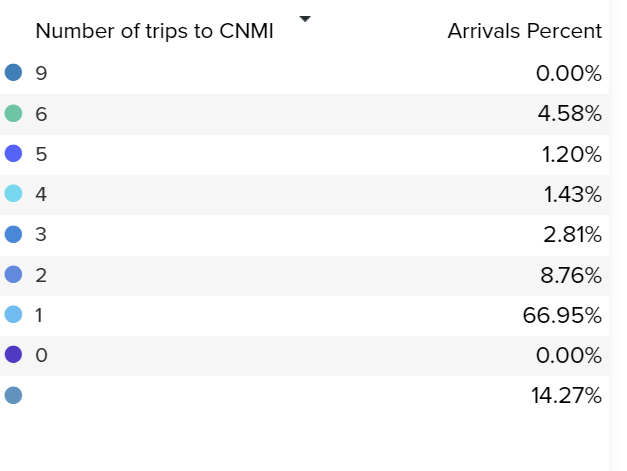
Optix has also seen many new features and enhancements this sprint, for example, editors can now invite other users to authorize data source connections, ensuring organizations can create Storyboards without sharing credentials. This feature is a continuation from the previous sprint, where design mockups for data source invitation emails were drafted. The invitation feature is included both during Optix onboarding, when prompted to connect an integration, as well as when visiting the data explorer section within Optix. Users are instructed to enter an email, where the recipient will then be instructed on how to connect their data source integration. Please contact support@optix.ai if you have any questions.
Dummy and demo data have also been enhanced this sprint, enabling users to build templates without a live connection. In many cases, new users want to create meaningful visual examples in the template builder, but have yet to connect any data source connections within Optix. This feature allows a user to “mock” data, and build visuals with fake data, which helps provide an example of how our unique visuals work, without needing to connect personal data.
A few other updates to Optix include: YouTube and Google AdSense have been updated to the latest API version, new Optix users will receive updated trial alert emails to keep track of their remaining trial days, and admins can now choose to hid any sensitive data source connection information from any other users within their organization. This last feature ensures that only the data source owners has access to details like database URLs, queries, and personal connection information.